Contact Form 7 1.9.1

Happy New Year! I have just released Contact Form 7 1.9.1 and this version includes support of pipe notation, little bug fixes and translation updates.

Pipe Support

Imagine that you are a webmaster of a company and you need a contact form on your site which will allow the sender to select an email recipient. Let’s say that the options are the CEO of the company (ceo@example.com), the sales department (sales@example.com) and the support department (support@example.com).

You’ve been able to achieve this in the past with Contact Form 7 in this way: first, make a drop-down menu or radio button for the selection (you can do this by inserting a form tag such as:

[select recipient "ceo@example.com" "sales@example.com" "support@example.com"]

into the form template); second, enter a corresponding mail tag ‘[recipient]‘ into the ‘To:‘ field. This ensures that the email is sent to the specific address that the sender selected.

However, there has been a problem with this. By using this procedure, the email addresses are revealed over the Internet and this is not good. These addresses could then become targets of evil spammers very quickly.

So, what you need is a way to allow senders to select from closed data safely. The pipe (‘|’) support is just for this very purpose.

Change the form tag of drop-down menu to:

[select recipient "CEO|ceo@example.com" "Sales|sales@example.com" "Support|support@example.com"]

If you insert a pipe (‘|’) character in the middle of the option value, only the part before the pipe will be open to the outside, and the part after the pipe will be used for mail replacement.
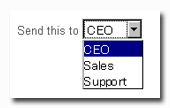
Pipe sample image

You can use this pipe only in the drop-down menu values, radio buttons or checkboxes. If you don’t like this feature, you may define the constant WPCF7_USE_PIPE as false to disable it.

Translation Updates

New additions:

Updated:

Thank you very much!


(Japanese / 日本語)

明けましておめでとうございます。Contact Form 7 1.9.1 をリリースしました。パイプ記法のサポート、少量のバグ修正、翻訳のアップデートが含まれています。

パイプのサポート

あなたが会社のサイトのウェブマスターになった場面を想像してください。そのサイト上に、送信者が宛先を選択できる仕組みのコンタクトフォームを設置することになったとしましょう。わかりやすい例として会社の CEO (ceo@example.com)、営業担当(sales@example.com)、サポート担当(support@example.com) の3つから宛先を選択できることにします。

こういったコンタクトフォームは、これまでの Contact Form 7 を使っても実現することは可能でした。まずドロップダウンメニューかラジオボタンを設置して (つまり次のようなフォームタグをフォームのテンプレート内に挿入するわけですが)、

[select recipient "ceo@example.com" "sales@example.com" "support@example.com"]

次にこれに対応するメールタグ ‘[recipient]‘ を ‘宛先:‘ の項目に入力します。こうすることでメールは送信者が選んだアドレスに送信されることになります。

ところが、これには問題がありまして、この方法を用いた場合、選択するメールアドレスがインターネットに公開されることになり、簡単にスパムのターゲットにされてしまうという好ましくない事態を招いてしまいます。

というような事情で、データは公開したくないがそのデータを選択対象としては使いたいというニーズを安全に満たす必要が出てきたわけですが、パイプ (‘|’) のサポートはまさにこの目的のためにあるのです。

先述のドロップダウンメニューのタグを次のように変更しましょう:

[select recipient "CEO|ceo@example.com" "営業担当|sales@example.com" "サポート担当|support@example.com"]

オプションの値の中でパイプ文字 (‘|’) が使われている場合、外部に公開されるのはパイプより前の部分だけで、またメールのテンプレートで使われるのはパイプより後の部分になります。

パイプをこの機能で使うことができるのはドロップダウンメニュー、ラジオボタン、チェックボックスの場合に限られます。もしこの機能が好きにはなれなくて無効に(つまり以前と同じに)したい場合は、WPCF7_USE_PIPE 定数を false として定義すればそうなります。

翻訳のアップデート

新規追加:

既存の更新:

みなさんどうもありがとう!


Comments

67 responses to “Contact Form 7 1.9.1”

  1. wew…congrats bro…!
    Keep creative..! :D

  2. cool, thanks :)

  3. The update seems to have broken my nav bar… any way I can roll back to 1.8.1.1? I can’t find a download on your site.

  4. twopeak Avatar
    twopeak

    hmmm; even with the pipe sign the email is still visible to email harvesting bots who check the source of documents.
    I haven’t tried it yet, but I’m considering making a dropdown with only the first name of a person and then in the form go for something like [recipient]@domain.com

  5. Great! This is the only feature your plugin lacked. Thanks!

  6. Emil, sorry to hear that. You can download old versions from here.

    http://wordpress.org/extend/plugins/contact-form-7/download/

  7. twopeak, don’t worry. Your email address doesn’t appear on the source.

  8. Hi . I would like to insert somewere php that will retrive information from widget and put it in message as plain text. Im using plugin called QuickShop that integrates with Contact Form v2OWP ( http://green-beast.com/blog/?page_id=136 )

    This script puts variables in to message in form
    ==============================================================

    $forms.=(‘
    ‘.$x_or_h_br.’

    Message’.$x_or_h_br.”);
    // Add quickshop integration by adding the cart info into the text area.

    if ($_SESSION[‘qscart’] && is_array($_SESSION[‘qscart’]))
    {
    $forms .= (‘I would like to order the following items:
    ‘);
    foreach ($_SESSION[‘qscart’] as $item)
    {
    $forms .= (“”.$item[‘name’].” – Price: $”.$item[‘price’].” – Quantity: “.$item[‘quantity’].”
    “);

    }

    }
    $forms.=(”.$x_or_h_br.’

    ==============================================================

    I would like to integrate it in your contact form. Would you like to help ? where is line where i can add this script or only get variables and write message , is there a way to do that . please help.

  9. Is there anyway to control the width of a drop-down box? Even if the select choices are only 5-6 letters long, the pull-down extends to the width of the page. Thank you for your efforts.

  10. Just started using this plugin. Have found it very simple to configure and it works perfectly on WordPress 2.7. Thanks

  11. RickG, set a class or an id to the drop-down menu, and then apply styles with CSS.

  12. I’ve just installed the newest version of contactform 7 on WP 2.7 and when I’m tryin to access the configuration site, nothing shows up. Any suggestions?

  13. hi,

    this update conflicts with the Lightbox 2.8 plugin. it stops it completely. help please? thanks

  14. Manuel, on WordPress 2.7, Contact Form 7’s admin page is under Tools menu.

  15. soup, they are working completely on my site. You should validate your site.

  16. Yeah I know but CF 7’s admin page doesn’t display properly. The content doesn’t load. I don’t see any options just an empty content area (Test with FF3 and IE7). Firebug doesn’t throw any errors.

    Thanks

  17. Feature Request:

    Could you please add an alternative to Captcha that does not require a graphic image?

    I would like the option to use a math question (eg 2+5=?) to determine if someone is a real human or a spambot.

    The is_human() plugin has the functionality that I’m interested in, but I can’t make it work with Contact Form 7 (http://wordpress.org/extend/plugins/is-human/).

    Thanks,
    Mordaga

  18. […] min av Contact Form 7 v1.9.1 er nå tilgjengelig for […]

  19. Manuel, that’s curious. I guess there may be conflicts with other plugins or corruption of WordPress’ core files.

  20. Mordaga, yeah I’m thinking about it. Hou do you think about this syntax?

    [quiz your-quiz-1 "2+5=?|7"]
    [quiz your-quiz-2 "The capital of Brasil?|Brasilia"]

    Before the pipe (‘|’) is question, after is correct answer.

  21. Hi miyoshi,

    I think that syntax would work well.

    Would the plugin then randomly select one of the quiz questions to display?

    -Mordaga

  22. Mordaga, yeah it would be nice!

    [quiz your-quiz-2 "5+7=?|12" "32-15=?|17" "4*8=?|32"]

    like this?

  23. Miyoshi,

    That looks great!

  24. Excellent plugin!
    Quick question: how can I control the dropdown menu width to use it with the pipe option?
    I set up the tag and it works, its just that the width of the ddmenu takes the whole width of the post/area area.
    Thank you.

  25. I just confirmed that the pipe didn’t work, the test mail was sent to the mail that I wrote in the MAIL section of the plugin (the one before MAIL (2)) instead of the one I selected in the DDmenu, I know Im missing something because english is not my first language.
    Thank you.

  26. @Ernesto you can control the dropdown menu width with CSS stylesheet.

  27. @Ernesto it is a correct behavior. You must set the To: field in the Mail section as corresponding to the dropdown menu’s name. In the case of above example, [recipient] should be in the To: field.

  28. hello i am using Contact form 7. it works great from my computer and even my phone but not on any other computers. what do i need to do to fix this?

    thanks

  29. @miyoshi you rock! thanks for the reply, unfortunately I cant figure out the dropdown in the css thingy, but I WILL figure the other thing you explained to me

    Thank you very much

  30. omg! I did it! I did both!, I know css is nothing but for me it is.

    Now all is working, thanks to you miyoshi.

  31. @chris, buy another one if you are using Akismet spam filtering on Contact Form 7, disable it as a test.

  32. Hi,

    Great plugin – it works great in FF 3.0.5 but I am having problems in IE 6.0.2.

    When someone does not submit the form correctly the “red text warning boxes” do not display correctly. They are partly hidden behind the text boxes on the form? Any way to fix or any advice?

    Thanx everyone!

  33. Hi Miyoshi,

    Is there a way to get the pipe variable?

    eg.[select recipient “CEO|ceo@example.com” “Sales|sales@example.com” “Support|support@example.com”]

    How do I get “CEO” or “Sales” or “Support”.
    I would like this to be the subject of the email.

    Thanks for reading!
    -Ray

  34. @SystemRunner unfortunately you can’t use text before pipe (CEO, Sales and Support in that case) in mail template. It behaves just a label in a form. If the same domain is shared among the mail addresses, you can use this instead:

    [select recipient "ceo" "sales" "support"]

    And in your mail subject:

    [recipient]@example.com

    Not elegant but works anyway.

  35. Hi again,

    I am struggling to get the multiple recipient thing to work. I’m thinking it’s the syntax in the To: fiels I’m not able to code correctly.

    So if the select-box is:

    [select recipient “abc|boss@abc.com” “def|webadmin@abc.com”]

    What would the whole tag for the To: field be? I have tried a bunch of variations with the [recipient] tag, but so far no success. It is failing to send whatever i do. The menu looks fine.

    Thanks!

  36. Iskwew, the tags are correct. Do you get errors? If you see “success” message with green border but don’t receive mails, probably there is restriction on your mail server. Try putting this into the To: field.

    abc123 <[recipient]>

  37. Yes, I get the “Failed to send your message. Please try later or contact administrator by other way.”

    The tag in the To: field should be:

    [recipient “abc|boss@abc.com” “def|webadmin@abc.com”]

    ?

  38. No. Please do this test first. Insert this tag into “To:” field:

    Web Admin <webadmin@abc.com>

    (Of course you must replace the mail address by correct one you can receive.)

    If this still fails, you should check your mail server first.

  39. It sent that one correctly.

  40. Try

    Web Admin <[recipient]>

  41. Jepp, that worked too.

  42. Everything works like a charm now.

    Thank you so much for your patient help!

  43. Well, I’m stumped (but loving the plugin).

    Web Admin — works fine
    Web Admin — fails

    Any thoughts?

    Here’s my select build:

    [select recipient “Questions, Rates & General Inquiries|name@domain.com” “Quotes, Service & Operations|name@domain.com” “Sales & Service|name@domain.com”]

  44. I think your form stripped out the square triangular and square brackets, and the word “recipient” in example #2. I had what you suggested to Iskwew on February 7, 2009 at 6:17 pm – and it fails.

  45. Solved: i think it may have been the ampersand code “&” in my select build. Once I removed it, all seems to be working. Could that be it?

    Thanks again for an *great* plugin.

  46. I can’t seem to control the text color of the “Your message was sent successfully. Thanks.” or “Validation errors occurred. Please confirm the fields and submit it again.”

  47. I am trying to get the multiple e-mail recipient to work. The dropdown works fine and when I insert
    Web Admin into the mail field, it works. But how can I add more than one recipient to the mail field?

  48. cheetahtrackclub Avatar
    cheetahtrackclub

    haha – need to make this easier for us who read the instruct and then say – “insert what into what form template where”

  49. dangster Avatar
    dangster

    Clear as mud.

  50. Is there a way to add a bcc to the pipe option?

    so you would have something like this?

    general info | name@emailaddress.com, Bcc: name2@emailaddress.com

Leave a comment