Contact Form 7 FAQ

This post is no longer updated. Move to Contact Form 7 official site.


Download | Plugin Homepage | FAQ | Support Forum

(日本語の FAQ はこちら)

  1. Where is the settings page for Contact Form 7?
  2. How can I add a contact form into my post content?
  3. How can I add a field to my contact form?
  4. Nothing shows up in the email, even after adding a tag to the form! How can I include a new field’s input in the email?
  5. I get emails containing codes such as [foobar]. What’s this? I want to see the user’s input.
  6. How can I specify a subject for the email?
  7. Can I place a contact form outside a post?
  8. Can I embed a contact form into my template file?
  9. After submitting the form, I get an error message stating “Failed to send your message”. What is wrong?
  10. I get an error message with a red border. So, how can I solve this?
  11. I see a response message “Your message was sent successfully” with green border, but I never receive a mail for that.
  12. The spinning arrow icon shows up once I submit a form, but then nothing happens.
  13. My contact form behaves oddly on certain browsers.
  14. I want to use contact form in my language, not in English. How can I do that?
  15. CAPTCHA does not work; the image does not show up.
  16. CAPTCHA’s text input box is working on Internet Explorer, but not with Firefox. I cannot enter the code.
  17. File upload & file attachment do not work.


Where is the settings page for Contact Form 7?

Log into WordPress and open Settings > Contact Form 7.

Update: It’s in Manage > Contact Form 7 since Contact Form 7 1.8.

Update: WordPress 2.7 moved the page to Tools > Contact Form 7.

How can I add a contact form into my post content?

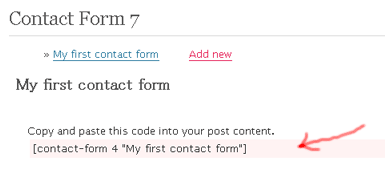
Open the settings page for Contact Form 7, and then open the contact form you want to add.

Each contact form has its own tag, such as [contact-form 1 "My contact form"]. To insert the contact form into your post, copy the tag and paste it into the post content.
faqimg1.png

How can I add a field to my contact form?

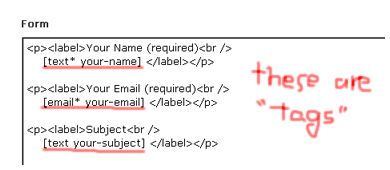
To add a field, add a tag to the Form textarea.
faqimg2.png

Each tag has a strict syntax, supporting several options (see Contact Form 7 Tag Syntax).

Learning the syntax might be difficult, but you can easily make a custom tag by using the tag generator instead. Click Generate Tag and simply select the options you’re interested in.

Nothing shows up in the email, even after adding a tag to the form! How can I include a new field’s input in the email?

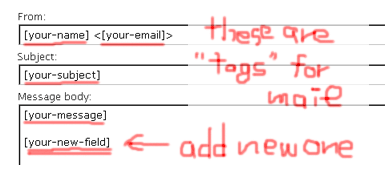
You need to add a new tag to the Mail fields. This tag should correspond to the tag in the Form you wish to include in the email. Thus, when you add a new form tag such as [text your-new-field], the corresponding email tag would be [your-new-field]. Only the second part of the tag (“your-new-field”, in this case) is needed for the email.
faqimg3.png

A tag in the Mail field will be replaced with the user’s input contained in a form field with the same name.

I get emails containing codes such as [foobar]. What’s this? I want to see the user’s input.

See above. In this case, no form tag corresponds to the [foobar] email tag. A tag in the Mail field which has no corresponding tag in the Form will be left without replacement.

How can I specify a subject for the email?

Simply edit the Subject field in the Mail section (not in the Form section).

Can I place a contact form outside a post?

Yes. You may place a contact form in a text widget as well.

Can I embed a contact form into my template file?

No, this functionality is not yet supported.

After submitting the form, I get an error message stating “Failed to send your message”. What is wrong?

There could be two causes for this. The first is actual mail server trouble, where email cannot be sent. In this case, the error message would be surrounded with a RED border line. Contact your server admin.

The second possible cause is that the form content is classified as spam by Akismet. In this case, the error message would be surrounded with a YELLOW border line.

I get an error message with a red border. So, how can I solve this?

There are really various reasons for server side problems, so I can’t explain exactly what yours is. But experiences of other users who solved their problem might be helpful for you.

Mario Vargas says he solved a mail-related problem with WP-Mail-SMTP plugin.

I see a response message “Your message was sent successfully” with green border, but I never receive a mail for that.

Showing the green border message means that the PHP function for sending the mail has certainly completed successfully. So if you can’t receive the mail, it’s highly possible that the mail has been kidnapped or killed after that.

If you can check the log of your mail server, it could give you some clues. Spam filter often causes this kind of problem.

The spinning arrow icon shows up once I submit a form, but then nothing happens.

This is most probably due to a conflict between plugins. Try deactivating all other plugins.

My contact form behaves oddly on certain browsers.

This may be caused due to invalid HTML, CSS, or Javascript. Please check your form page with a validator or debugging tool.

Useful tools:
Firebug — Firefox extension. Good for Javascript debugging.
XHTML-CSS Validator — A validator with a good UI.

I want to use contact form in my language, not in English. How can I do that?

Contact Form 7 has been translated into many languages. See if the languages folder contains a language file for your language.

The locale setting of Contact Form 7 follows the locale setting of WordPress. Once you change the WordPress locale to, Contact Form 7 is also changed. See how to change the WordPress locale here.

CAPTCHA does not work; the image does not show up.

To use CAPTCHA, you need GD and FreeType library installed on your server. Also, the contact-form-7/captcha/tmp folder must be writable.

Contact Form 7 1.8 and later require wp-contents/uploads/wpcf7_captcha folder writable, instead of contact-form-7/captcha/tmp.

Update (2009/03/23): Contact Form 1.9.4 and later refers your upload folder setting in Settings > Miscellaneous menu for resolving the base directory for CAPTCHA’s temporary folder. So it may not use wp-contents/uploads/wpcf7_captcha. For example, when your upload folder is set “wp-content/myfiles”, CAPTCHA temp files will be created in wp-content/myfiles/wpcf7_captcha, so you need to make that folder writable.

CAPTCHA’s text input box is working on Internet Explorer, but not with Firefox. I cannot enter the code.

This is a well-known issue caused by misusing the <label> element. Make sure you are using it correctly.

This is good:

[captchac your-captcha]
<label>Enter the code: [captchar your-captcha]</label>

This will not work correctly:

<label>[captchac your-captcha]
Enter the code: [captchar your-captcha]</label>

File upload & file attachment do not work.

See this post.

File uploading and attachment with Contact Form 7


Comments

440 responses to “Contact Form 7 FAQ”

  1. DUH! After struggling with this for two days it was a “PEBKAC” error. While re-reading my own post for help the recurrence of the number “1” struck me as the problem.

    By changing my line to read:

    [text acct-number 60×25]

    The field is now 60 characters long on the screen but will accept 25 typed characters. Somehow I must have missed this in reading the documentation.

    Thanks again. Keep up the great work!

  2. excellent plugin!
    one question… i tried to change the mail_sent_ok message but nothing changes. how do I make the changes? I was able to change the field sizes without any problem. Please help!
    Many thanks!
    Tom

  3. I like a couple people before uploaded the plugin, set it up but when testing it received NO email even though it said that everything was confirmed. Anyway of fixing this? I understand that some emails such as Gmail or Yahoo do not work. However, I was using my hotmail account.

    Thank you

  4. Doesn’t work with IE7 :

    Pressing ‘send’ on IE7 resulted in a spinning image.

    To fixed it:

    change
    $url = $url[‘path’] . (empty($url[‘query’]) ? ” : ‘?’ . $url[‘query’]) . ‘#’ . $unit_tag;
    to
    $url = $url[‘path’] . (empty($url[‘query’])) ? ” : ‘?’ . $url[‘query’] . ‘#’ . $unit_tag;

    http://wordpress.org/support/topic/259875

  5. Hi I am wondering if there is a way to center the contact form on a wordpress page – see http://www.juicedigitalmarketing.com/contact

    Thanks

  6. […] возникли какие-то вопросы – можете глянуть мини FAQ на сайте автора плагина либо задавайте в […]

  7. I just wanted to say how amazed I am at how easy your plugin is to use. Thanks very much and keep up the good work!

  8. Your plugin is great! But, do you have any filter to avoid spammers abuse the contact form? I’ve just installed it and in 5 minutes later, 4 porn spam messages are already in my inbox! LOL..

  9. James Avatar
    James

    Out of curiosity, is there anyway to set up the plugin so that it will reject messages with html tags in them?

  10. nirok65 Avatar
    nirok65

    Hi this plugin conflicts with Mailpress just thought i’d let you know that… errors come about when it doesn’t allow you to submit the contact form with the red error message

    so disabling mailpress allow this to work

    Thanks

  11. Hi,
    After submitting the form, the timer turns non-stop. The visitor thinks that the mail was not sent, he click therefore to Send while the message is sent.What is wrong?

  12. Hi,

    I keep receiving the error message “Failed to send your message. Please try later or contact administrator by other way” after I click the send button, please help me out!!

    Here you can find the form from my contact page at http://www.jlbambooproducts.com/blog/index.php/contact-us/

  13. dear sir,
    I have use 3 dropdown form and when I check my email is blank and just save the description (text message & subject).. how to make it work..?
    thanks befored..

  14. displays two email forms, only need one.

  15. Hi – great plugin but experiencing an error every time I try to add a change to the form:
    “Cannot load contact-form-72/wp-contact-form-7.php.” The odd thing is that the change appears to have been saved – it appears on the refreshed page. However, and I don’t know whether this is related – I cannot get the drop down field to email it’s content. I have tried different variations of the tag in the message body area – but all that seems to happen is that whatever content I include in the tag variant gets reproduced in the mail – ie the chosen item of the dropdown isn’t ever picked – its’ just reproduces the tag. I assumed that adding the automatic content of the generated tag would be the right thing – but even if I truncate it to the menu+ID (without the contents of the dropdown choices), I get exactly that instead. I must be doing something stupid – or the error message has something to do with it?

    Hope you can help, the plugin is just so simple to use otherwise!

  16. Hi

    Thanks for a great component working smoothly.

    I’m using the same contact form in multiple posts and wants to be able to distinguish which post the visitor submits his email from.

    Then I noticed that the tag for having the contact form in a post is:

    [contact-form 1 "Contact form 1"]

    I suspect that the later “Contact form 1” is some user defined name of not the contact form itself, but maybe a specific usage of it. I tried changing this to “Hi World” as in

    [contact-form 1 "Hi World"]

    on one of my posts and the form still works.

    Is there a way I can put that name “Hello World” into the message or subject of an email? Or wasn’t that the intention of it?

    Thanks!

    Michael

  17. Ollie Avatar
    Ollie

    Hi

    I need to filter the contact form 7 forms (the saved contact forms that are in teh WP database) through a language filter function for a bilingual WP site.

    I have this working for the other plugins on the site but can’t get it to work on this plugin.

    The code looks like this in another plugin:

    // Ollie – Bilingual integ
    if(function_exists(‘apply_filters’)) {
    $keywords = apply_filters(‘the_keywords’, $keywords);
    }

    Do you know where I should put this code in the wp-contact-form-7.php? I’ve tried it in a bunch of places but it is not filtering the content. The page this is on is at http://www.goodlifecoaching.ie/contact-us/, you can see the unfiltered code there on that page with the language tags not being filtered out.

    Thanks
    Ollie.

  18. The spinning arrow continues to spinand does not send message from Contact Form 7. The Forum thought is that other plug-ins may be iterfering and suggests deactivated all of the others. This is not an acceptable solution sine I use the other plug-ins.

    Other solutions? Would it help to upload to a file other than the wp-content-plug-ins file? Should I just use another Contact form (suggestions?)?

  19. Hi,

    i want to ask why my google apps account can’t receive a message using contact form 7. But, the status of the message is OK. If i using another email account is working. What i should to do?

    Thanks
    Gatut

  20. oliver Avatar
    oliver

    I get the same error as Gatut,

    “Hi,

    i want to ask why my google apps account can’t receive a message using contact form 7. But, the status of the message is OK. If i using another email account is working. What i should to do?”

    Any help would be greatly appreciated.

    thanks

  21. I’m getting similar problems as above, in regards to content from the form not showing up in the Mail Area.

    I’ve added the fields from the form into the mail area but all I get is the tag reproduced in the email that is sent.

    CAPTCHA image still doesn’t work with all the workarounds I’ve seen. And we do have GDI Support.

    So I am really at a loss as to what to do.

    If anyone has any insight on to how to resolve these issues it would be greatly appreaciated if they would pass the information along my way.

    Thanks again
    Timothy Caron

  22. sam biller Avatar
    sam biller

    Come on man, at least out of respect to people reply to some of the questions here!

  23. hello am using contact form 7 on one of my websitte everything is working fine but when i submit the form it gives a message that the message is sent but there is no message coming in my email? where does it send the message?

  24. Help please,
    I am not sure where things went bad, but I think ever since I upgraded contact 7 I now have a syntax error “[Break on this error] \n” on line 1 of http://www.rmlmetals.com/wp-content/plugins/contact-form-7.js?ver=1.10 that shows through firebug, another excellent firefox plugin. Should I manually edit that file or the wp-contact-form-7.php file??? Please someone help promptly please, much appreciated. Oh, that error is now showing on every page of my website http://www.rmlmetals.com

  25. How can I change the width of dropdown menus?

  26. I can’t get either the check boxes nor whats written in the text box to come via e-mail/ I enter the tags exactly as your site states, but all I get is the tag, not the info! It doesn’t work!

    Also, none of the questions asked above have any answers! Not much of an FAQ if I can’t get help!

  27. For those of you who are experiencing the constant “spinning arrow” (or other strange issues) after submitting a message….

    I was able to isolate the WP Super Cache plugin as the culprit conflicting with CF7.

    As soon as I deactivated it, everything worked like a charm. I know it’s not the ideal solution, especially for those who rely on SC, but it worked for me.

    Hopefully Miyoshi is able to patch this in a future update.

  28. Kris, when I tested them on my testing environment, WP Super Cache and Contact Form 7 worked without conflicts. Could you tell me more detail how you were using them, please?

  29. I have been using this contact form on a website http://sponsorsarah.co.uk. But I found the same problem as oli78 above:

    Doesn’t work with IE7!!!

    I tried what was suggested and it worked perfectly, so thanks very much Oli78!!!

    Also would like to say that I have tried many wordpress contact forms and this has to be best by a long shot.

    Graeme

  30. I have had two seperate nightmare occasions with WP super cache, where I had to backup entire installation to previous day. I am novice at this stuff. LOL. Well, I fixed my issues with wordpress contact form 7 from earlier. I used NVU because it was free at work to do some updates and did not realize that it was adding HTML tags everywhere automatically on my files which was creating the two DOCTYPES on my site, causing me to spin my wheels. OH, I know use Notepad ++ to do my editing at work! Hope it helps.

  31. Don’t work if server working in safe mode.

  32. enterline Avatar
    enterline

    I’ve used contact form for years, love it. I’m using wordpress 2.7.1 and have noticed that the widget of contact form does not work correctly on firefox and IE browsers. The message box has no right hand border and the typing runs linear on one line. When I add the tags to set columns I can get a line to appear but it does not force the type to next line, it still goes on forever on first line. Not sure what else to try. Shows and works fine on Safari browser.

  33. I experienced the same probleme as Kris with the spinning arrow. I disabled WP Super Cache and It works but I would like to use both.

  34. CAN ONLY GET EMAIL TO BE RECEIVED IF EMAIL ADDRESS IS NOT SAMES AS WEBSITE ADDRESS. HAS ANYONE ELSE EXPERIENCED THIS?

    KELLEY@PIEDMONT-HOOPS.NET

  35. stumped Avatar
    stumped

    I’m not sure if I’m the only one experiencing this problem or I’ve totally missed some important points to overcome this.

    My problem is this. I would like to ‘format’ my email such that there will be paragraphs or breaks in between the fields.

    Right now, I have a few fields and all is generated in one paragraph like this.

    How do I insert break or paragraph into my emails?

    All help is very much appreciated.

    Thank you.

  36. 69magazine Avatar
    69magazine

    Howdy folks, I am using this contact form for competitions and it is all running in a rather niffty fashion. However I would love to be able to make it so that the user can only submit one form.

    Any ideas on how to do this?

    Thanks dudes.

  37. the textarea does not work for number of characters–like 30×10

    it generates 10 rows, but not 30 characters wide

    can you look into this

    thanks

  38. I am trying to use the form on a Submit News Tips page. All looks fine except the boxes for Your Name, Your Email and Subject do not show. Visitors will not know where the box is. Is there a way to edit a template or something so it shows the input boxes?

    Please help.
    Here is the page where I have inserted the form:
    http://qulinnews.com/news-tips-form/

  39. daveshook Avatar
    daveshook

    Hi.
    I have a dumb question. First time with wordpress, setting up a new site, on an OS I am not familiar with. I have downloaded and activated contact form 7 and really simple Captcha. What do I need to do to get the CAPTCHA to show up? Should it show up automatically without me doing any coding or configuration, or am I missing something?

    I have set the permissions on the tmp directory to 777 while I sort this out, so I don’t think that’s it.
    Thank you for your help. These plugins are really helpful!

  40. This is a great plugin anyway to add a redirect to Thank you page option to it?

  41. I have a problem! Avatar
    I have a problem!

    I had CAPTCHA working on my Contact form… but then I changed the directory of WordPress (from “blog” it changed to “content”).

    Now the CAPTCHA image doesn’t show up any more.

    CAN YOU HELP ME? PLEASE??

  42. Hello,

    I canot see the security code in my contact form

    WP 2.8 Contact Form 7 und Really Simple CAPTCHA can you help me ?

    regards
    angel

  43. Hi,

    I am using Contact Form 7 on a website and I was wondering if there was a database that it kept to keep track of all the information submitted? If there is how do I access that database so that I can get a listing of the email addresses?

  44. I’m using the contact form which is great. However how can I change the size of the fields?

  45. This is an excellent contact form. Thank you very much for creating it.

    Can the submitter’s IP address be included in the email? This would help understanding where the message sender coming from (country and city) via Geo IP look up.

    Regards,
    BoB

  46. Anonymous Avatar
    Anonymous

    Help!

    The email arrives, with the FROM field as username

    So the actual email always appears as if it was addresssed by my own site, and ignores the [your-email] field that is supposed to be the FROM field

  47. I changed the message body to the following…

    [your-message]

    [text* nameofrestaurant]
    [text* your-name]
    [text* YourPosition]
    [email* your-email]
    [textarea* TypeOfFood]
    [text HeadChef]
    [checkbox* Bar “yes” “no”]
    [radio radio-879 “beer only” “wine only” “beer and wine” “all types of liquor” “none”]
    [file RestaurantMenu filetypes:pdf]
    [file file-282 filetypes:jpg|gif|png]
    [text* PhoneNumber]
    [textarea* YourAddress]
    [textarea* HoursofOperation]
    [radio Attire “casual” “sport jacket needed” “formal”]
    [text yourwebsite]
    [radio ReservationsNeeded “yes” “no” “no but helpful”]

    and now that is the same thing i get in the email instead of the answers…how do i fix this.

  48. Hi there

    Great Plugin

    Just one problem, when i recieve emails it does’nt say who the mails are from, any suggestions?

  49. Hi,

    My “contact us” form is not sending any e-mail. all configuration is fine. I am working on it for last three days but didn’t find any solutions. right now its 4:30AM here and i haven’t slept yet because of this bug. My eyes are getting closed. please do help me. before i use to receive mail but after upgrading it everything is gone, i even included (global $wp_version;) but everything went in vain. I hope you will help me. Before wasting you time i did some googling but no answer all the way till 20 pages, so i had to disturb you, hope you wont mind.

    Thanks in Advance,
    anyway you plugin is good but only one small problem which i am not able to handle.

  50. Randy Avatar
    Randy

    Does anyone know how I can add a “Copy Me” check box so that the user’s submited email gets a copy of the form info sent? Can’t find any info on this.

    Thanks

Leave a comment