Contact Form 7 FAQ

This post is no longer updated. Move to Contact Form 7 official site.


Download | Plugin Homepage | FAQ | Support Forum

(日本語の FAQ はこちら)

  1. Where is the settings page for Contact Form 7?
  2. How can I add a contact form into my post content?
  3. How can I add a field to my contact form?
  4. Nothing shows up in the email, even after adding a tag to the form! How can I include a new field’s input in the email?
  5. I get emails containing codes such as [foobar]. What’s this? I want to see the user’s input.
  6. How can I specify a subject for the email?
  7. Can I place a contact form outside a post?
  8. Can I embed a contact form into my template file?
  9. After submitting the form, I get an error message stating “Failed to send your message”. What is wrong?
  10. I get an error message with a red border. So, how can I solve this?
  11. I see a response message “Your message was sent successfully” with green border, but I never receive a mail for that.
  12. The spinning arrow icon shows up once I submit a form, but then nothing happens.
  13. My contact form behaves oddly on certain browsers.
  14. I want to use contact form in my language, not in English. How can I do that?
  15. CAPTCHA does not work; the image does not show up.
  16. CAPTCHA’s text input box is working on Internet Explorer, but not with Firefox. I cannot enter the code.
  17. File upload & file attachment do not work.


Where is the settings page for Contact Form 7?

Log into WordPress and open Settings > Contact Form 7.

Update: It’s in Manage > Contact Form 7 since Contact Form 7 1.8.

Update: WordPress 2.7 moved the page to Tools > Contact Form 7.

How can I add a contact form into my post content?

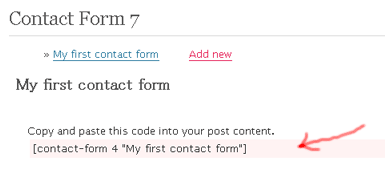
Open the settings page for Contact Form 7, and then open the contact form you want to add.

Each contact form has its own tag, such as [contact-form 1 "My contact form"]. To insert the contact form into your post, copy the tag and paste it into the post content.
faqimg1.png

How can I add a field to my contact form?

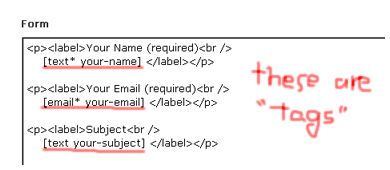
To add a field, add a tag to the Form textarea.
faqimg2.png

Each tag has a strict syntax, supporting several options (see Contact Form 7 Tag Syntax).

Learning the syntax might be difficult, but you can easily make a custom tag by using the tag generator instead. Click Generate Tag and simply select the options you’re interested in.

Nothing shows up in the email, even after adding a tag to the form! How can I include a new field’s input in the email?

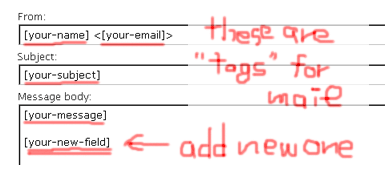
You need to add a new tag to the Mail fields. This tag should correspond to the tag in the Form you wish to include in the email. Thus, when you add a new form tag such as [text your-new-field], the corresponding email tag would be [your-new-field]. Only the second part of the tag (“your-new-field”, in this case) is needed for the email.
faqimg3.png

A tag in the Mail field will be replaced with the user’s input contained in a form field with the same name.

I get emails containing codes such as [foobar]. What’s this? I want to see the user’s input.

See above. In this case, no form tag corresponds to the [foobar] email tag. A tag in the Mail field which has no corresponding tag in the Form will be left without replacement.

How can I specify a subject for the email?

Simply edit the Subject field in the Mail section (not in the Form section).

Can I place a contact form outside a post?

Yes. You may place a contact form in a text widget as well.

Can I embed a contact form into my template file?

No, this functionality is not yet supported.

After submitting the form, I get an error message stating “Failed to send your message”. What is wrong?

There could be two causes for this. The first is actual mail server trouble, where email cannot be sent. In this case, the error message would be surrounded with a RED border line. Contact your server admin.

The second possible cause is that the form content is classified as spam by Akismet. In this case, the error message would be surrounded with a YELLOW border line.

I get an error message with a red border. So, how can I solve this?

There are really various reasons for server side problems, so I can’t explain exactly what yours is. But experiences of other users who solved their problem might be helpful for you.

Mario Vargas says he solved a mail-related problem with WP-Mail-SMTP plugin.

I see a response message “Your message was sent successfully” with green border, but I never receive a mail for that.

Showing the green border message means that the PHP function for sending the mail has certainly completed successfully. So if you can’t receive the mail, it’s highly possible that the mail has been kidnapped or killed after that.

If you can check the log of your mail server, it could give you some clues. Spam filter often causes this kind of problem.

The spinning arrow icon shows up once I submit a form, but then nothing happens.

This is most probably due to a conflict between plugins. Try deactivating all other plugins.

My contact form behaves oddly on certain browsers.

This may be caused due to invalid HTML, CSS, or Javascript. Please check your form page with a validator or debugging tool.

Useful tools:
Firebug — Firefox extension. Good for Javascript debugging.
XHTML-CSS Validator — A validator with a good UI.

I want to use contact form in my language, not in English. How can I do that?

Contact Form 7 has been translated into many languages. See if the languages folder contains a language file for your language.

The locale setting of Contact Form 7 follows the locale setting of WordPress. Once you change the WordPress locale to, Contact Form 7 is also changed. See how to change the WordPress locale here.

CAPTCHA does not work; the image does not show up.

To use CAPTCHA, you need GD and FreeType library installed on your server. Also, the contact-form-7/captcha/tmp folder must be writable.

Contact Form 7 1.8 and later require wp-contents/uploads/wpcf7_captcha folder writable, instead of contact-form-7/captcha/tmp.

Update (2009/03/23): Contact Form 1.9.4 and later refers your upload folder setting in Settings > Miscellaneous menu for resolving the base directory for CAPTCHA’s temporary folder. So it may not use wp-contents/uploads/wpcf7_captcha. For example, when your upload folder is set “wp-content/myfiles”, CAPTCHA temp files will be created in wp-content/myfiles/wpcf7_captcha, so you need to make that folder writable.

CAPTCHA’s text input box is working on Internet Explorer, but not with Firefox. I cannot enter the code.

This is a well-known issue caused by misusing the <label> element. Make sure you are using it correctly.

This is good:

[captchac your-captcha]
<label>Enter the code: [captchar your-captcha]</label>

This will not work correctly:

<label>[captchac your-captcha]
Enter the code: [captchar your-captcha]</label>

File upload & file attachment do not work.

See this post.

File uploading and attachment with Contact Form 7


Comments

440 responses to “Contact Form 7 FAQ”

  1. How does one get the checkboxes to mail the info?
    I need help with the checkboxes…

    FORM:
    SELECT WEB SITE DESIGN NEEDS:
    FLASH WEBSITES: See Templates
    [checkbox Whatareas “Web Design – Flash – 5 Pages”]
    [checkbox Whatareas “Web Design – Flash – 10 Pages”]
    [checkbox Whatareas “Web Design – Flash -20 Pages”]
    [checkbox Whatareas “Web Design – Flash -50 Pages”]

    FORM MAIL:

    [your-name]
    [your-address]
    [your-homephone]
    [text your-cellphone]
    [email your-email]
    [email your-email]
    [text your-bday]
    [text your-occupation]
    [text your-domain]
    [text your-howdidyou]
    FLASH WEBSITES:
    [checkbox Whatareas “Web Design – Flash – 5 Pages”]
    [checkbox Whatareas “Web Design – Flash – 10 Pages”]
    [checkbox Whatareas “Web Design – Flash -20 Pages”]
    [checkbox Whatareas “Web Design – Flash -50 Pages”]

    It does not email me this information about the checkboxes…it just email me this information below:

    [checkbox Whatareas “Web Design – Flash – 5 Pages”] [checkbox Whatareas “Web Design – Flash – 10 Pages”] [checkbox Whatareas “Web Design – Flash -20 Pages”] [checkbox Whatareas “Web Design – Flash -50 Pages”]

  2. Hi, great plugin!

    I have added the form to my website and have added a drop-down to the form when an option is selected, the form will send to the email address assigned to it.

    That is all well and good, one thing i need to be able to do is add a hyperlink from another page that will link to an option in the drop-down box so when the page loads, that option is selected.

    Can this be done?

  3. bcmoseley Avatar
    bcmoseley

    Does anyone know the answer to the question Taylor has about the checkbox? I cannot get it to email me the checked info either. I get the same results.

  4. To answer Taylor’s question: You need to go to the bottom of the contact form you’ve created in Contact Form 7 and add your checkbox name to the body of your message. You’ve got to put it in brackets, too. For instance, if you created a checkbox that looks like this: [checkbox foo “Foo”], you’ve got to go to the message field for the form, and enter the following: [foo]. What you’re doing is adding the name of the checkbox you created. If someone checks that box, the name of the field (“foo” in this case) will show up in the message. If they don’t check that box, nothing will show up. It took me a few tries to figure this out, but it’s working perfectly now. Hope this helps!
    Fred

  5. I use CAPTCHA in my contact form. But the image doesn’t show up. My site has GD and Freetype installed. The folder
    contact-form-7/captcha/tmp has permission 755
    wp-contents/uploads/wpcf7_captcha has permission 755
    so why the CAPTCHA image doesn’t appear?

  6. hi,
    i installed contact form 7 and activated it but i do not see the option in settings. i logged out and logged back in but still no help.

    any thoughts?

  7. hi
    I need help. Contact form doesn’t accept yahoo or gmail. No yahoo email or gmail email can submit any forms. It will be block by program in both condition of having aksimet active or not. if sender email address is gmail or yahoo it gives orange error “Failed to send your message. Please try later or contact administrator by other way.” or sometimes with red border. Please someone help me to fix it or even dis-active the spam rule on that. Please email me at hirbod at usartstudios.com or leave the respond here. My website is http://www.usartstudios.com.
    Thanks

    Can you help me out

  8. @usartstudios When I use my company email (myname@nameofmycompany.cz), I have the same problem (“Failed to send your message. Please try later or contact administrator by other way.”). If I try to send it via different my, it works perfectly. Is there any way how to set up this plugin? Thank you very much.

    Btw: On the other side, this is great plugin. Thanks for it.

  9. rhassall Avatar
    rhassall

    I have installed contact form 7 on WP 2.7.1 and activated it but no Input boxes appear.

    I have looked on the support forum, but I am new to this and do not know where to input the code.

    Could someone send me a sample form code with instructions on where to input it? They could send it to hassallrudy[at]hotmail.com.

    Thanks

  10. Your Name (required)
    [text* your-name]

    Your Email (required)
    [email* your-email]

    Subject
    [text your-subject]

    Your Message
    [textarea your-message]

    [captchac captcha-78 size:s fg:#ffffff bg:#000000]
    Enter the code: [captchar captcha-78 20/60]

    [submit “Send”]

    page link http://blog.montereyrentals.com/?page_id=29

    I have set the permission to 766 on the tmp file and still no image

    i think they have the right gd installed
    http://blog.montereyrentals.com/php.php

    please advise

    thank you

  11. Thank you so much! I love the plug in! I spent the whole evening trying different things before I finally came across this. I only have one question. I’m not terribly fond of the green that encloses the message the sender receives. I mean, it’s a nice green by itself, but it kind of clashes with the green in my logo. Is there any way to change this?

  12. @ Stacey Rainer
    All you need to do to change that green color is to edit the Contact Form 7 output CSS.
    Open: /wp-content/plugins/contact-form-7/stylesheet.css
    Find: div.wpcf7-mail-sent-ok { border: 2px solid #398f14; }
    Change: #398f14 to whichever color you like.
    All done!
    Just keep in mind that any changes you make here will be lost next time you update the plugin. Simply make a separate note of the changes you make so that you can easily apply them again if and when it’s needed.

  13. Nevermind, my form validates now. I had to add a closing p tag at the end of the form in the WP admin. Whatever is clever

  14. muymalestado Avatar
    muymalestado

    Possible to widen the [your-message] area for punter to type in their message text?

  15. great plugin, but i can’t find way to make the fields bordered.
    please check http://metacamp.us/contact
    i wrap it with blockquotes but still not look good though.
    i don’t know. it maybe conflicting with css of the theme.

  16. Hi. My captcha images are all of a sudden all black. Any idea why?

  17. Kyle Domingo Avatar
    Kyle Domingo

    I installed Contact Form 7 and the tags are as follows:

    —————————————
    Your Name (required)
    [text* your-name]

    Your Email (required)
    [email* your-email]

    Subject
    [text your-subject]

    Your Message
    [textarea your-message]

    [submit “Send”]

    —————————————

    The *From* field is set to

    —————————————
    [your-name]
    —————————————

    And the *To* field is set to my gmail account.

    When I tried to test the form, the email arrives in my gmail account but the FROM field is

    —————————————
    Murang Gamot
    —————————————

    Murang Gamot is my wordpress website.

    Any ideas how to set the *FROM* field to the name and email of the original sender?

  18. ronjo84 Avatar
    ronjo84

    I know I am doing something ridiculous, but on my page I get the contact form and all of the slugs below the contact form. Why are the tags showing up below the contact form? This is exactly what I placed in my pages html box:

    [contact-form 1 "Contact"]

    [text* your-name]

    [email* your-email]

    [select Subject include_blank “Ask a Question” “Bugs/Concerns” “Advertise with Us”]

    [textarea your-message]

    [submit “Send”]

    Any help would be appreciated.

  19. My form page contains

    [contact-form 1 "Contact form 1"][quiz quiz-204]

    The form appears, but instead of a quiz, just
    [quiz quiz-204]
    appears below the form. I think I misunderstood something here.

  20. hi miyoshi,

    do you still have plans to ad the ability to forward to a “Thank-you” page or a customisable URL upon successful submission?

    Thanks!

  21. ferg, I don’t have any plans to add “Thank-you page”.

  22. Thank you for this great plugin!

    But I still have a little issue in its deployment:

    How to validate a number ? (I would like to check if the content of the Phone field is really a number)

    Thank you

  23. Mahmoud M’HIRI, currently no method validating number supported.

  24. i get nothing in my email. How it have to be set up?
    thanks.

  25. Is there a way to change the justification of the contact form? Center or right justify it?

  26. I am using the Light 1.0 theme & Contact Form7. It works great. However the borders of the fields are not visible making the form a little hard to use. How do I make the field border visible? What part of code do I tweak? The form is implemented on this link: http://e3cube.co.in/ponder/.

  27. stmiguel Avatar
    stmiguel

    HELP PLEASE, CAN ANYBODY TELL ME WHY I CAN’T USE THE PLUG IN, I GET THE FOLLOWING MESSAGE WHEN OPENING THE PLUG IN FROM THE TOOLS MENU IN WORDPRESS.

    Fatal error: Cannot use string offset as an array in /home/asmbe/public_html/wp-content/plugins/contact-form-7/wp-contact-form-7.php on line 454

  28. I just wanted to share a simple solution to the Captcha no displaying.

    Go to Settings in WP
    then click on Miscellaneous

    there make sure your “Store uploads in this folder” is correct.

  29. Thanks for the super easy-to-use plugin!

    Also, THANKS to Fred for the help with the checkboxes! Sorted me out, mate!

  30. Hello, thanks for creating this great contact form, it’s integrated in many of my blogs and websites.

    Quick question…

    Is there a way to redirect users/visitors to a DIFFERENT page of the blog/website upon form submission INSTEAD of displaying the “thank you” message after the send/submit button is pressed on the same page…?

    Many thanks!

  31. waseemakhtar Avatar
    waseemakhtar

    Hello, I have installed the plugin and its sending the test message successfully. However, I am unable to use Contact Form 7 through this plug-in. Is there a way to make Contact From 7 workable through this plug-in?

    Thanks

  32. how to i unsubscribe from these posts? it says ‘see comment notification emails’ but I cannnot see them

  33. Hi, thanks for this Awesome plugin. I have the same question as Dimitry above.. It is important to have a separate thank you page so you can measure contact form submissions as a conversion in google adwords. Can you please make specifying a landing page upon success an option in the next release.

    Thanks so much,

    Jake

  34. Hi, thanks for this Awesome plugin. I have the same question as Dmitry above.. It is important to have a separate thank you page so you can measure contact form submissions as a conversion in google adwords. Can you please make specifying a landing page upon success an option in the next release.

    Thanks so much,

    Jake

  35. For those of you trying to figure out how to do a custom landing page on successful submission.. I’ve found a quick workaround

    http://www.grapethinking.com/wordpress-contact-form-7-plugin-landing-pag

  36. Hi, thanks for writing the plug-in, much appreciated.

    I’m trying to change the color of the message that’s displayed once the e-mails sent.

    eg: Your message was sent successfully. Thanks.

    My background is black and so is the color of the text message.
    I’ve looked through the stylesheet.css file but can’t find the reference to font color?

    Thanks,
    Marty

  37. Hello,

    Out of all the contact plugins that I found, this one seems good as of now. I filled up the page, clicked submit, but I never recieved the test email. Could any one please help me with this.

    Thanks
    BOB

  38. I suppose, someone reads these messages, I am not able to sort out the solutions for the above FAQ. I hope I get an answer soon.

    Thanks,
    BOB

  39. Jake – thanks a ton for finding that custom landing workaround – will try it out today.

  40. My form works and email is generated at http://www.coloradohealthinsurancebrokers.com/free-personalized-health-insurance-quote-recommendations/ but I the form no longer verifies required fields and just shows a spinning arrow rather than any type of success message.
    I uninstalled all plugins and that did not resolve it. I think it either has to do with the new Flash upgrade or could there be a conflict with super cache? I deactivated super cache and rolled back my .htaccess file, but that did not solve the problem. Those are the only changes I’ve made, so I am stumped as to why this isn’t working.
    I strongly suspect the new Flash update may be the culprit.
    Thanks,
    Mark

  41. Does this plugin store collected information to the database?

  42. Dear iDeasilo,
    I have installed contact form 7 in my website, but when I try to send a message using contact form, I do not get the message in my email. What’s going on? Thank you!

  43. Charles Avatar
    Charles

    Hi, I’m having the same problem as Samuel. I get the “your mail was sent” message, but I never receive it. However my server’s mail works fine since I receive “new comments” mail messages. Note that I’m not talking about wordpress.com but a server installation –> http://www.charlau.com/blog. You can see it by clicking on “Contactez-moi” on the sidebar.

    Thanks!

  44. When I use this form on the live site, it sends the form correctly to my email but redirects me to a “Page Not Found” page. Can someone help me troubleshoot this? You can test the live form here: http://www.avalanchefl.com/advertising/

    The form:
    ————

    RFP Budget:
    [select* RFPBudget “$2,500 to $25,000” “Over $25,000”]

    Geo-Targeted Locations:
    [text* GeoTargeting]

    Select Targeting: (Choose Multiple)
    [select* targeting multiple “Family” “Hair Color” “Income Range” “Height” “Weight Range” “Orientation” “Relationship Status” “Relationship Type” “Country” “Distance willing to travel” “Horoscope”]

    Impression Volume:
    [select* Price “2,500,000” “5,000,000” “10,000,000” “25,000,000 and higher”]

    Campaign Duration:
    [select* Campaign “1 month” “3 months” “6 months” “9 months” “1 year”]

    Available Ad Formats: (Choose Multiple)
    [select* AdFormats multiple “728×90” “300×250” “728×90” “720×300” “Text Links”]

    Company:
    [text* company]

    Your Name:
    [text* name]

    Your Email:
    [text* email]

    Billing Information:
    Please Include (Address, City, State & Zip, Phone, Fax, Website, US DNB)
    [textarea* Billing]

    [submit “Send”]

    ————————-
    The Email Notification – Message Body
    ————————-

    [RFPBudget]

    [GeoTargeting]

    [targeting]

    [Price]

    [Campaign]

    [AdFormats]

    [company]

    [name]

    [email]

    [Billing]

  45. I’ve seen the workaround for a custom “success page” and it only works for one (1) such page.

    For anyone using more than a single form, this becomes a real issue.

    Is there any way such a variable can be added to the next version of this awesome script?

    In my case, I need to present the visitor with more options after he’s sent his message.

    Many thanks!

  46. notjustanotherjones Avatar
    notjustanotherjones

    miyoshi,

    On March 16 you said you had no plans of implementing a “thank you” page. However after that date it was posted on the forums on wordpress.org that you were now planning to include this on future releases.

    Will this be in future releases? The hacks that have been provided on the forums are not work for me. Can you please email me an answer. I would be more than happy to send you a donation for help with this.

    It’s very confusing for people that have very large forms. They don’t see the ajax message and type out all of the information again. It’s kinda defeats the purpose of having an ajax message on there and your visitor to your site gets frustrated.

    Any help on this would be greatly appreciated.

    Thanks

    Dan

  47. rajagopal Avatar
    rajagopal

    hi, nice plugin. I have integrated all the things in my site. I have successfully got the email. But in the email name, email, and other text fields are missing. How can I fix it….

  48. urgent here need help…..can anyone tell me how to change the background colour that is whote to any darken colour coz my website background colour is white also……has try to edit css but failed…..pls anybody help me….

  49. want to cc email to person sending email. can anyone help?

  50. Great plugin. Everything works fine for me except…

    When I specify the form field size (using CF7 1.9.4 on WP 2.7.1)

    Ex. [text acct-number 60×1]

    The text box size appears on the screen correctly however I can only type one character into the text box. When I remove the “60×1” portion of the field descriptor, the text box goes back to displaying as it’s normal size on the screen but I can again type whatever I want into the box.

    This behavior only appears to be on “text” fields. “textarea” fields seem to work correctly.

    Any suggestions? Is anyone else having this problem?

    Thanks again

Leave a comment