I released Contact Form 7 1.7.3 last week. I added two options for dropdown menu, checkboxes and radio buttons. default: option allows you to set initially selected or checked items. label-first option is for checkboxes and radio buttons; this makes checkbox-label order reverse.
See also: Contact Form 7 1.7 (The introduction of select+, checkbox, checkbox+ and radio typed tags)
Setting default with default: option
For example, this tag:
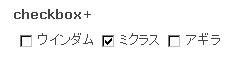
[checkbox your-checkbox default:2 "ウインダム" "ミクラス" "アギラ"]
makes the second item “ミクラス” checked initially. The integer following default: is the position in the order of items. 1 is the first one.
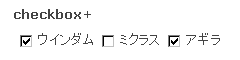
If you want to make two or more items checked, joint integers with _ (underbar) as:
[checkbox your-checkbox default:1_3 "ウインダム" "ミクラス" "アギラ"]
Changing checkbox-label order with label-first option
By default, checkbox and radio button are put first, and a label last.
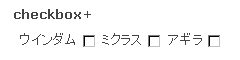
By adding label-first option to checkbox and radio button type tags, you can reverse them.
[checkbox your-checkbox label-first "ウインダム" "ミクラス" "アギラ"]
(In Japanese from here)
Contact Form 7 1.7.3 を先週リリースしました。ドロップダウンメニュー、チェックボックス、ラジオボタン用の2つのオプションを追加しました。default: オプションはデフォルトで選択またはチェックされる項目を指定するために使います。label-first オプションはチェックボックスとラジオボタン専用で、チェックボックスとそのラベルの表示順序を反転させます。
参照: Contact Form 7 1.7 (select+、checkbox、checkbox+、radio タイプのタグの紹介)
default: オプション: デフォルトの指定
たとえば次のタグ:
[checkbox your-checkbox default:2 "ウインダム" "ミクラス" "アギラ"]
この場合、2番目の “ミクラス” がデフォルトでチェック済みになります。default: に続く整数が項目の中での位置を示します。1 が最初のものです。
2個以上の項目をチェック済みにしたいなら、整数を _ (アンダーバー)でつなぎます:
[checkbox your-checkbox default:1_3 "ウインダム" "ミクラス" "アギラ"]
label-first オプション: チェックボックスとラベルの順序を反転
デフォルトではチェックボックスまたはラジオボタンが先に配置され、そのラベルが後になります。
チェックボックスまたはラジオボタンで label-first オプションを指定すると、これが反転します。
[checkbox your-checkbox label-first "ウインダム" "ミクラス" "アギラ"]


 iDeasilo
Leave a comment