This post is no longer updated. Move to Contact Form 7 official site.


Download | Plugin Homepage | FAQ | Support Forum

(日本語の説明はこちら)

Summary

screenshot

Just another contact form plugin. Simple but flexible.

  • Supports multiple contact forms.
  • You can customize form and mail contents with simple markup.
  • AJAX submitting with jQuery Form Plugin.
  • Spam filtering with Akismet.
  • Bot prevention with CAPTCHA.

Download and Install

Download the latest release from WordPress.org plugin directory.

  1. Upload whole contact-form-7 folder to the /wp-content/plugins/ directory
  2. Activate the plugin through the ‘Plugins’ menu in WordPress

Usage

  1. Open admin page [Options] – [Contact Form 7] [Manage] – [Contact Form 7].

    Update: If you are using WordPress 2.7 or greater, you can find the admin page under [Tools] – [Contact Form 7].

  2. Edit default “Contact form 1” or add new and save it.
  3. Copy [contact-form ...] code and paste it into the content of any posts you need the contact form.

FAQ

See Contact Form 7 FAQ

How to customize form and mail contents

You can use “tags” in several fields. Contact Form 7’s “tag” is formed string enclosed in square brackets [].

A tag used in form content is replaced by HTML form control element like <input> or <textarea>.

A tag used in mail template is replaced by user input of element with the same name.
wpcf7-desc

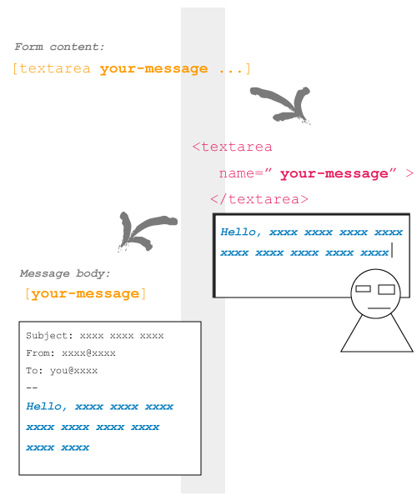
In this picture, a tag [textarea your-message ...] inserted in form content is replaced by <textarea> tag with name="your-message" attribute.

When a visitor input into this <textarea> field and submit, Contact Form 7 generates a mail based on mail template. Since message body field has [your-message] tag, this tag replaced by the user input message.

Tags in form content

You can use the following types of tags in form content.

Type Replaced by Validated as
text <input type="text" /> Any text
text* <input type="text" /> Any text / Required
email <input type="text" /> Email address
email* <input type="text" /> Email address / Required
textarea <textarea> </textarea> Any text
textarea* <textarea> </textarea> Any text / Required
select <select> </select>
select+ <select> </select>
checkbox <input type="checkbox" /> ...
checkbox+ <input type="checkbox" /> ...
radio <input type="radio" /> ...
captchac <img /> CAPTCHA
See How to use CAPTCHA
captchar <input type="text" />
submit <input type="submit" />

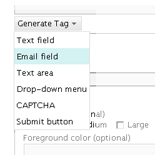
The syntax of tag is not so easy. You can use Generate Tag menu under Form textarea to make a tag you need.

I show you some examples of tags.

  • [text your-name 40/100 "John Smith"]

    This tag is replaced with:
    <input type="text" name="your-name" size="40" maxlength="100" value="John Smith" />

  • [email* your-email 60/ id:email]

    <input type="text" name="your-email" id="email" size="60" />

  • [textarea your-message 80x15 "Write message here."]

    <textarea name="your-message" cols="80" rows="15">Write message here.</textarea>

  • [select your-country "China" "India" "other"]
    <select name="your-country">
      <option value="China">China</option>
      <option value="India">India</option>
      <option value="other">other</option>
    </select>

I wrote about tag syntax.

How to use Akismet on Contact Form 7

1. You need Akismet plugin. If you have not activated it yet, activate it first.
2. Open Contact Form 7’s admin page and edit Form text area as:

  • Add akismet:author option to the tag of field which requires sender’s name.
    Example: [text* your-name akismet:author]
  • Add akismet:author_email option to the tag of field which requires sender’s email address.
    Example: [email* your-email akismet:author_email]
  • Add akismet:author_url option to the tag of field which requires sender’s URL.
    Example: [text your-url akismet:author_url]

Once you have activated the Akismet plugin and at least one of the akismet: options is set, Contact Form 7 will send all of a sender’s input as well as any other information related to input activity to the Akismet server. Akismet will then judge whether this input is likely to be spam.

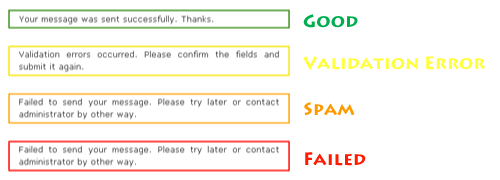
When Akismet judges a message as spam, Contact Form 7 sends no mail and shows a response message with an orange border line (the third example in the picture below).
To make sure the spam filtering is working, send a message with “viagra-test-123” as the sender’s name. If the test is a success, the message will be judged as spam.

Changelog

0.9 (2007/04/30)
Initial release.
1.0 (2007/05/20)
Tag helper.
1.1 (2007/08/02)
File restructuring.
1.2 (2007/08/16)
jQuery Form Plugin introduced.
1.3 (2007/08/26)
New tag type: [select]
1.3.1 (2007/08/26)
Critical bug about JavaScript loading fixed.
1.3.2 (2007/09/03)
Bug fix around jQuery.
1.4 (2007/09/07)
Akismet spam filtering introduced.
1.4.1 (2007/09/11)
Add Spanish and Catalan translations.
1.4.2 (2007/09/13)
Add German translation.
1.4.3 (2007/09/15)
Add Polish translation.
1.4.4 (2007/09/17)
Add French translation.
1.5 (2007/10/07)
CAPTCHA introduced.
1.6 (2007/10/17)
Mail (2) and UI improvement for admin page.
1.6.1 (2007/10/27)
Sidebar widget support.
1.7 (2007/11/27)
New tag type: [select+], [checkbox], [checkbox+] and [radio]
1.7.1 (2007/12/06)
Made wpcf7 variable global. Polish translation updated.
1.7.2 (2007/12/13)
Bugfix. Czech translation added.
1.7.3 (2007/12/23)
New default: and label-first options added.
1.7.4 (2007/12/30)
select+ and checkbox+ tag types removed. multiple and exclusive options added.
1.7.5 (2008/01/26)
Two fixes and include_blank option.
1.7.6 (2008/03/02)
New acceptance tag added.

Comments

1,401 responses to “Contact Form 7”

  1. How do I style the forms?

    In CSS do I put wpcf7-validates-as-required ? any pointers or info would be great.

    thanks

  2. I’ve set up a form, and it successfully sends a message, but it does not show the “Thank you” message. Instead, it goes to the “Page not found” screen. There are no error messages in the Firebug console.

  3. Hi,

    Thanks a lot for your great work!

    A quick question : do you expect to implement date tags in your plugin? – It’s in my opinion the only one thing that is actually missing.

    A JS calendar that makes you able to select a date…

    Thank you for everything!

    Cheers,
    Alexis

  4. Hello,

    After I tried to discuss my problem regarding to the contact form here :-

    Contact Form 7 2.0.2

    I try it again after 10 days to find the solution of the problem.

    1) How to load the Javascript files (or the plugin itself) only on one of the contact page (instead of loading it on the whole website where it is not needed!!!!)

    2) How to move the javascript files to be loaded in the FOOTER instead of header.

    If anybody please can help me or point me to some solution in internet I shall be very thankful.

    Regards.

    Devin

  5. While a halfway decent plugin, I would’ve appreciated having a little more control over the styling, as there’s very minimal tag IDs to target CSS with. Using paragraph tags without any sort of ID (or a class) is making it really hard to customise the form without having to dig through piles of code.

    Second, PLEASE use label tags for denoting form fields. There’s absolutely no reason not to use them: they make navigating an interface a hell of a lot easier (clicking a label brings the input focus to the attached input field), and it helps provide better placement control amidst convoluted layers of CSS. While it might sound like a nitpick (and I confess to being pretty banal about the subject), the fact that so many developers don’t bother making use of label tags when coding is really a nuisance.

  6. Is it possible to change the length of the text boxes so they can fit on my side bar?

  7. Wp2.8.4
    Jen e reçois pas les résultats de mes questions,des ratios,pourquoi ???

  8. thank you very much for the plug-in, it’s great. Works fine, no problems at all.

  9. […] Contact Form 7 – Perfect tool for placing a contact form on your blog without leaving your email address open to the spammers. […]

  10. I would like to report a possible bug when you use Contact Form 7 with multiple forms.

    With multiple forms created, when I change the messages and the additional settings, they do not save under the right form. Instead, the form uses everything from the first form.

    For example, I have changed the messages and additional settings for my second, third and fourth form. When a user submits the second form, the additional settings code from the first form is triggered. Whereas, the additional settings code for the second form did not trigger.

    Is there a possible solution to this?

  11. The verb system is a simplified version of the systems found in English and the Romance languages. ,

  12. jerome robins Avatar
    jerome robins

    i cant get one of the forms to work. can someone help?

    the url is: http://www.highdefentertainment.com/book/

    i get “Failed to send your message. Please try later or contact administrator by other way.”

    can someone help me out?

  13. […] Contact Form 7 1.7.7 by Takayuki Miyoshi […]

  14. […] Contact Form 7 –  My contact page uses it. Even without the captcha (I hate captcha) it catches 99.9% of email spam for me. Love the name too […]

  15. How can you edit contact form 7 so it reads left to right..

    Name–>Name box
    Thanks

  16. Efrem R. Jasso Avatar
    Efrem R. Jasso

    Hello,

    Great plugin! Is there a way to direct a user to another page after they submit their form?

    I tried to embed a URL in the “success” message and noticed that it doesn’t render into HTML. Is there a way to do this if I cannot do a redirect?

    Thank you for your attention and response!

  17. My Contact Form 7 of the Word Press error to upload a large file.?
    When you attach a file to the form he carries a message of error ”
    upload a file failed for some reason “and” Validation Errors “wanted
    know if you have any solution for this.

  18. I need to develope a automatic responder (a message to setup as default to send on every mail received) in the form mail inside my website.

    Can I setup, this feauture, to this plugin?

  19. How to make a “thank you page” with WP 2.8.5?

  20. where is the updated post for this? lovin the plugin now off to locate the updated thread.

  21. […] Contact Form 7 – Cine vrea o pagină de contact o poate avea în câteva secunde. Cine vrea să poată crea şi, să zicem, chestionare mai complicate sau diverse formulare ale căror date să fie trimise prin email cuiva, poate folosi de asemenea Contact Form 7 cu succes. Faptul că pluginul este bine menţinut la zi şi are traducere în limba română sunt argumente suplimentare. […]

  22. Hello,

    I am having a very difficult time trying to get my contact 7 form working. I changed themes and now it will not work. Any assistance would be greatly appreciated. It tells me the form has been sent, although I do not receive anything in my email.

    Thank you in advance

  23. Is there a way to direct a user to another page after they submit their form?

  24. hi,

    can anybody help me with the drop down menu tags… i have a form in which i have an option of drop down menu.. and i want the option to appear in the email that is sent to me once the form is submitted… but i cant find the tag to add in the email message area…

  25. I found this article on how to redirect the page to a ‘thank you’ page (or post) that you create. Note that it will redirect every form on your blog to this page, so design a standard thank you page to use. Here are the instructions:
    http://www.grapethinking.com/wordpress-contact-form-7-plugin-landing-pag

    I use it and it works great!

  26. […] indexed by search engines, prevent google and Yahoo Spiders Bots and locking themselves in a loop 9. Contact Form 7 you can create a contact form for your own blog:). This allows the visitor to your blog, can easily […]

  27. Stunning, I did not know about that up to the present. Thanx!!

  28. Hallo,

    I’m having same problem as Brian, but I don’t seem to read the answer to his problem in here.

    Anyone know what can I do if:
    Once I set up a form, it successfully sends a message, but it does not show the “Thank you” or “Validation Error” or “Spam” message.
    Instead, it goes to the “ERROR 404-Page not found” screen.

    What can it be???
    I’ve used this form before in another website I did and it worked without problem.

    I’ll appreciate your help thanx!

  29. Hallo,

    In case someone had this same problem as me. I didn’t have any response here, but found the answer in the Support Forum.

    You can solve the ERROR 404 Page submitting page with:
    “I had this same issue, and strangely enough, I fixed it by switching a field I created called [name] to [your-name]. Not sure why that caused a problem but it seems to have done the trick.”

    And indeed that was the only trick.

  30. […] Contact Form 7 by Takayuki Miyoshi […]

  31. Hi

    I personally prefer Contact Form 7 since it’s so easy to install and get started with it. Just by simple activating the plugin you will have a fully functional contact form, without any hassle.

    kinza

  32. I used plug-in contact form 7 version 2.0.7 to my website. I use wordpress version 2.8.6. There are plug-in can not work. When users complete contact information and click send, it just only the notice is not sent.

    This is the path to my contact page http://icemusic.net/lien-he/

    And This is the path to the image of the plug-in option: http://i283.photobucket.com/albums/kk306/lehoangloveinlove/LinhTinh/adminpanel.png

    Thanks for help me.

  33. […] Site officiel : ideasilo.wordpress.com […]

  34. […] sur ce lien pour télécharger l’extension Contact Form 7 de Takayuki Miyoshi et installez la (cf. dossier installation d’une extension […]

  35. Hey thre I was hoping you might have an idea of what is causing a problem I have when I install and activate your plugin.

    When I make the Contact Form 7 activate it then causes the the following problem in my admin section:

    Theme: ThrillingTheme 1.1 by Cody McKibben

    I have the following Plugins activate:
    Akismet Version 2.2.7
    All in One SEO Pack Version 1.6.10
    flickrRSS Version 5.1
    Google Calendar Widget Version 1.0
    MailChimp Version 1.1.8
    Redirection Version 2.1.24
    What Would Seth Godin Do Version 1.7
    WordPress Database Backup Version 2.2.2
    WordPress Related Posts Version 1.1.1
    WPtouch iPhone Theme Version 1.9.7.4

    Not Activate
    rpx Version 0.2.4
    Contact Form 7 Version 2.0.7

    Do you think there is a confict with between some of these? Any suggestions of where to hunt this down? SHould I contact the Contact Form 7 people?

    Thanks.

    Darrin

  36. Hi, i would like to know if what im trying to do is possible, im using contact form7 for a simple online voting, im trying to create a list of 50 with a maximum of 20 selection using checkbox,

    what i would like to do is, when a user checked more than 20 on the list, the system must check and verify the checkedbox and prompt the user if it is more than 20.

    im really eager to do this, please help me find my solution. thanks so much

  37. […] ۷-Contact Form: فرم تماس با نویسنده که تقریبآ همه جور وبلاگی از این افرم استفاده می‌کنند! […]

  38. […] Contact Form 7 – This email form is pretty simple, there are probably more powerful options available, but for what I need this does the trick. As you might expect, you can see it in action on my Contact page. […]

  39. Many thanks, great plugin and very helpful documentation- must have taken a long time!

  40. Hi, the last version of Contact Form 7 , don’t work fine, the input boxes disapear and only i see the origial [text] to make the forms…
    I’m downgrade to 2.1.0 and work fine.
    Please Check the last version.
    Regards,

    Max Sorribas

  41. […] Contact Form 7 You can very easy to create a contact form on your blog to the readers can contact your for aksing […]

  42. Grate blog, thank you… This gives me lot of answers, because could not manage my contact form right :)

  43. Thank you for the plug-in, I’ve been using it for a while with no problem. Would recommend it to anyone.

Leave a comment