This post is no longer updated. Move to Contact Form 7 official site.


Download | Plugin Homepage | FAQ | Support Forum

(日本語の説明はこちら)

Summary

screenshot

Just another contact form plugin. Simple but flexible.

  • Supports multiple contact forms.
  • You can customize form and mail contents with simple markup.
  • AJAX submitting with jQuery Form Plugin.
  • Spam filtering with Akismet.
  • Bot prevention with CAPTCHA.

Download and Install

Download the latest release from WordPress.org plugin directory.

  1. Upload whole contact-form-7 folder to the /wp-content/plugins/ directory
  2. Activate the plugin through the ‘Plugins’ menu in WordPress

Usage

  1. Open admin page [Options] – [Contact Form 7] [Manage] – [Contact Form 7].

    Update: If you are using WordPress 2.7 or greater, you can find the admin page under [Tools] – [Contact Form 7].

  2. Edit default “Contact form 1” or add new and save it.
  3. Copy [contact-form ...] code and paste it into the content of any posts you need the contact form.

FAQ

See Contact Form 7 FAQ

How to customize form and mail contents

You can use “tags” in several fields. Contact Form 7’s “tag” is formed string enclosed in square brackets [].

A tag used in form content is replaced by HTML form control element like <input> or <textarea>.

A tag used in mail template is replaced by user input of element with the same name.
wpcf7-desc

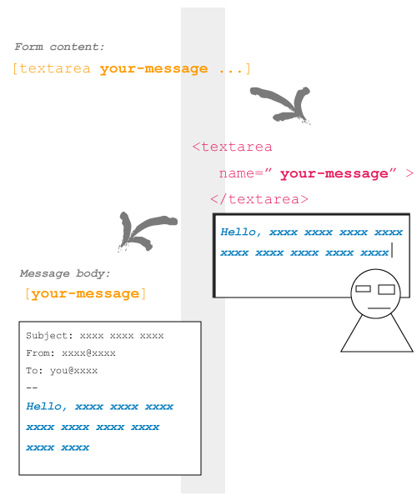
In this picture, a tag [textarea your-message ...] inserted in form content is replaced by <textarea> tag with name="your-message" attribute.

When a visitor input into this <textarea> field and submit, Contact Form 7 generates a mail based on mail template. Since message body field has [your-message] tag, this tag replaced by the user input message.

Tags in form content

You can use the following types of tags in form content.

Type Replaced by Validated as
text <input type="text" /> Any text
text* <input type="text" /> Any text / Required
email <input type="text" /> Email address
email* <input type="text" /> Email address / Required
textarea <textarea> </textarea> Any text
textarea* <textarea> </textarea> Any text / Required
select <select> </select>
select+ <select> </select>
checkbox <input type="checkbox" /> ...
checkbox+ <input type="checkbox" /> ...
radio <input type="radio" /> ...
captchac <img /> CAPTCHA
See How to use CAPTCHA
captchar <input type="text" />
submit <input type="submit" />

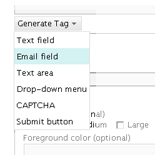
The syntax of tag is not so easy. You can use Generate Tag menu under Form textarea to make a tag you need.

I show you some examples of tags.

  • [text your-name 40/100 "John Smith"]

    This tag is replaced with:
    <input type="text" name="your-name" size="40" maxlength="100" value="John Smith" />

  • [email* your-email 60/ id:email]

    <input type="text" name="your-email" id="email" size="60" />

  • [textarea your-message 80x15 "Write message here."]

    <textarea name="your-message" cols="80" rows="15">Write message here.</textarea>

  • [select your-country "China" "India" "other"]
    <select name="your-country">
      <option value="China">China</option>
      <option value="India">India</option>
      <option value="other">other</option>
    </select>

I wrote about tag syntax.

How to use Akismet on Contact Form 7

1. You need Akismet plugin. If you have not activated it yet, activate it first.
2. Open Contact Form 7’s admin page and edit Form text area as:

  • Add akismet:author option to the tag of field which requires sender’s name.
    Example: [text* your-name akismet:author]
  • Add akismet:author_email option to the tag of field which requires sender’s email address.
    Example: [email* your-email akismet:author_email]
  • Add akismet:author_url option to the tag of field which requires sender’s URL.
    Example: [text your-url akismet:author_url]

Once you have activated the Akismet plugin and at least one of the akismet: options is set, Contact Form 7 will send all of a sender’s input as well as any other information related to input activity to the Akismet server. Akismet will then judge whether this input is likely to be spam.

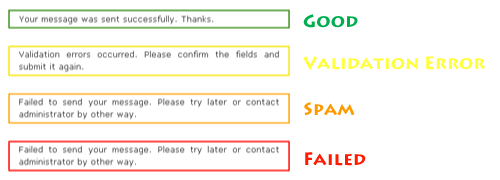
When Akismet judges a message as spam, Contact Form 7 sends no mail and shows a response message with an orange border line (the third example in the picture below).
To make sure the spam filtering is working, send a message with “viagra-test-123” as the sender’s name. If the test is a success, the message will be judged as spam.

Changelog

0.9 (2007/04/30)
Initial release.
1.0 (2007/05/20)
Tag helper.
1.1 (2007/08/02)
File restructuring.
1.2 (2007/08/16)
jQuery Form Plugin introduced.
1.3 (2007/08/26)
New tag type: [select]
1.3.1 (2007/08/26)
Critical bug about JavaScript loading fixed.
1.3.2 (2007/09/03)
Bug fix around jQuery.
1.4 (2007/09/07)
Akismet spam filtering introduced.
1.4.1 (2007/09/11)
Add Spanish and Catalan translations.
1.4.2 (2007/09/13)
Add German translation.
1.4.3 (2007/09/15)
Add Polish translation.
1.4.4 (2007/09/17)
Add French translation.
1.5 (2007/10/07)
CAPTCHA introduced.
1.6 (2007/10/17)
Mail (2) and UI improvement for admin page.
1.6.1 (2007/10/27)
Sidebar widget support.
1.7 (2007/11/27)
New tag type: [select+], [checkbox], [checkbox+] and [radio]
1.7.1 (2007/12/06)
Made wpcf7 variable global. Polish translation updated.
1.7.2 (2007/12/13)
Bugfix. Czech translation added.
1.7.3 (2007/12/23)
New default: and label-first options added.
1.7.4 (2007/12/30)
select+ and checkbox+ tag types removed. multiple and exclusive options added.
1.7.5 (2008/01/26)
Two fixes and include_blank option.
1.7.6 (2008/03/02)
New acceptance tag added.

Comments

1,401 responses to “Contact Form 7”

  1. […] Contact Form 7- תוסף זה מאפשר בנייה של דפי קשר וטפסים מתקדמים יותר די בקלות- הפתרון הכי יעיל למי שמחפש משהו קצת מעבר לטופס הבסיסי ליצירת הקשר. […]

  2. Good job with this plugin, easy to use, works great, thanks

  3. I love this plugin and have used it for about 2 years, but recently I noticed a couple of issues with it:

    1. It is having issues with CAPTCHA on WP 2.8. It doesn’t show CAPTCHA code instead displays the name of the CAPTCHA field and a random number generated by the plugin. I have really simple captcha installed but still get the issue.
    2. It would be perfect if when the form is submitted it could redirect to a different page on the site so I can track “conversions” with AdWords and Analytics.

    Thank you!

    Jeremiah

  4. This plugin is a lifesaver! Thank you!

  5. Nice work!
    Is it possible to have a redirect page when success? (for statistics & goals…). What is Additional Settings?

  6. Hello,

    your plugin is great but since the WP 2.8 update, I must either deactivate it or work with an incomplete admin panel… Are you planning an update?

    Thanks,
    OL

  7. frantsch Avatar
    frantsch

    Contact form 7 is the most flexible and suited one for my needs! I however have problems with localization.
    I loaded the german language files wpcf7-de_DE.mo and wpcf7-de_DE.po to the ../wordpress/wp-content/plugins/contact-form-7/languages, however the form remains unchanged, the translations will not show up. I do not have any problems with other installed plugins in terms of localization. does anybody have any idea what the problem could be with contact7?

  8. […] Contact Form 7 This is just a simple contact form that you can use for your readers to reach you. It’s what I use and haven’t had any problems with it. It’s simple and works great. Download this here. […]

  9. This plugin is fantastic. It works exactly as you would hope.

    The only thing i think i and many people need is the ability to re-direct to a thanks page.

    This could be because you want a more traditional finish, in my case i need to add google conversion code, and would just love to have this option.

    There’s hacks around the net everywhere but it makes it difficult when upgrades come out/etc.

    Any chance you couple build this into the system??

  10. Great contact plug-in for my website. Thanks for sharing.

  11. Thank’s for this plugin ; Is there a way of inserting css class into the fields. I’m having difficulty styling a file upload field. Any advise will be appreciated.

    Thank You Kindly.

  12. Hi Guy’s ,
    In case someone else has the same question as my previous comment, I found the correct place to insert some css class; go to the includes folder =>classes.php — line 379.

    Thank You Kindly

  13. Joe Polk Avatar
    Joe Polk

    I have installed CF7 and followed all of the instructions, but when I submit my contact form, I receive an email but there is no data contained within it.

    I have tried uninstalling the plugin, deleting all of the files off of the server and re-installing the plugin — but it still doesn’t work. I didn’t even change the sample form that came with the plugin. I just wanted to see if it would work before I customized the form.

    Can anyone help me with this? Thanks in advance for any and all replies!

    Joe

  14. Hi,

    A really useful plugin. Thanks.

    I have no problems with WordPress 2.8.

    I would like to add my voice to those campaigning for the addition of a redirect to a configurable Thank You page when the form submission is successful.

    Russell

  15. Thanks for the plugin!

  16. Thanks, this is realy a usefull plugin.
    It is exactly what was looking for!

    It would be nice if it could make a downloadable spreadsheet with an overvieuw of the sended forms.

  17. Great plugin and I really want to use it, but I have a little problem with it.
    I have activated the plugin, copy and pasted the code to a page where the form should be seen. I tried to send a test message, but when I click at “Send” I can see beside the button the turning around arrow, but this I see for hours. What can be the problem?

  18. hmm i seem to have this problem

    Fatal error: Call to undefined function add_shortcode() in /home//public_html/blog/wp-content/plugins/contact-form-7/wp-contact-form-7.php on line 324

    what went wrong?

  19. Hi,
    I’m having the same issue as Joe Polk, have reinstalled and installed as well. But the email comes as a blank — the only thing present is the message body text. I didn’t customize the form either.
    What am I doing wrong?

  20. […] Contact Form 7 – edhe ky eshte nje plugin qe gjeneron nje kod per te krijuar nje kontakt form (shiko faqen kontaktuese timen) dhe te njejtin kod mund ta perdoresh jo vetem ne faqe por edhe ne post po qe se deshiron. Eshte shume mi i lehte dhe me fleksibili per tu perdor. Bile me duket se nje Olgi Zenullllari e ka perkthyer ne shqip. […]

  21. Excellent plugin, we use it on our site and have modified it to update our db and print a pdf for the cust

  22. Great work, big thanks

  23. Excellent plugin – works perfectly with WP 2.8. Thanks a lot!

  24. hi, i tried to test the contact form 7 by sending a testing email and it didn’t work fine. the message show that i have successfully sent it but when i open my mail box, i couldn’t read the content. it only show this [your-message].

    Please kindly advise. Thanks:)

  25. Be sure you have the settings right in the message body.
    Here you can fill in every code you have used in the form.
    In your case this should be [your-message]

  26. Is there anyway you could rewrite this plugin to use WP-reCAPTCHA rather than Really Simple CAPTCHA as reCAPTCHA benefits society as well as provides security. I am interested in what you think. Thanks. I love the Contact Form 7!

  27. esdrujula Avatar
    esdrujula

    hi. I’ll like to know how could i manage the weight and hight of the contact form boxes. Could someone help me, thank you very much.

  28. Chuck, currently there isn’t. But I think it will be available some day.

  29. I’ve installed this plugin but am having issues when adding other fields. I seem to be able to get them to show up on the site, but they don’t come thru on the email to my inbox.

    I know there’s some super simple thing that will make me say “duh” but I’m very novice and baffled

  30. hi,

    sorry i still don’t get it work…

    this is the content in the form box:

    Your Name (required)
    [text* your-name]

    Your Email (required)
    [email* your-email]

    Famous Peranakan
    [text* FamousPeranakan]

    Why
    [textarea* why]

    [submit “Send”]

    should i change the message body content? orjust leave it as [your-message]? as i have watched the tutorial and found that it should be left as [your-message]…is that correct?

    please kindly advise…(newbie here…)

  31. just get it solved… it’s quite simple just that i was too confuse…thanks for the plugin!

  32. Hi, great plug in.

    Just wondering if there is an easy way to alter the size (width) of the text area? It’s a bit too wide for my site.

  33. akber kabir Avatar
    akber kabir

    Hi,

    i want to add an URL field, is it possible?

  34. I can’t get this plugin to work, although message ‘sent’ is displayed after clicking in ‘submit’ button.
    What could be wrong?
    My host is byethost and they have some spam filters, maybe there is a problem?

  35. […] 1.10.0.1 | Par Takayuki Miyoshi | Aller sur le site de l’extension MMZ dit: .- j’crois que ton ‘joindre un fichier’ môrche pô – – bon , du coup […]

  36. ojohman Avatar
    ojohman

    I have also issue with width of form. Anyone can tell how to address that issue? Im not expert in html or php. Great appreciated.

  37. what information is supposed to go into the body box

    i type in the code that contactform7 gives me but then that shows up in the email instead of the answer the visitor gave…

    I left if as [your-message] but then nothing shows up.

  38. You are a god among men. Thank you for this hugely useful and easy to use plug in. And thank you for your hard work with the support as well.

  39. This is a great plugin but it is not accessible. A Well formed form require LABEL tag usage on any visible field..

  40. […] Contact Form, serve per creare un form di contatto direttamente dal sito, e per dirla tutta appena attivate questo plugin è già tutto fatto ed anche in italiano. […]

  41. Just found this plugin via Yaro Starak’s email newlsetter. Great plugin – thanks!

  42. novatvstdios Avatar
    novatvstdios

    I know there’s some super simple thing that will make me say “duh” but I’m very novice and baffled

    then its not so simple

  43. Hi, the emails I recieve through the form don’t have the senders email address attached? So I cannot reply to people? Is there something i’m overlooking?

    Thanks for your help
    Ronnie

  44. Hello when i receive an email via the contact form it doesn’t come with the senders reply address, only the reply address of my own website admin. Can you tell me please how I can resolve it so taht I can see the reply address of the person who filled out the form?

    Thank you v.much Ronnie

  45. How to add in the website (optional)?

  46. I mean I tried to create a text field using the generate tag but when I tried sending using the contact field, with a website name in the your website (optional).

    The website name is missing in the email receive in the inbox of my email address. All other items like sender’s name, email address, subject and message are there accordingly.

    What tag to use so that the website address of sender will be sent to my email inbox together with all the items like sender’s name, email address, subject and message?

Leave a comment