This post is no longer updated. Move to Contact Form 7 official site.


Download | Plugin Homepage | FAQ | Support Forum

(日本語の説明はこちら)

Summary

screenshot

Just another contact form plugin. Simple but flexible.

  • Supports multiple contact forms.
  • You can customize form and mail contents with simple markup.
  • AJAX submitting with jQuery Form Plugin.
  • Spam filtering with Akismet.
  • Bot prevention with CAPTCHA.

Download and Install

Download the latest release from WordPress.org plugin directory.

  1. Upload whole contact-form-7 folder to the /wp-content/plugins/ directory
  2. Activate the plugin through the ‘Plugins’ menu in WordPress

Usage

  1. Open admin page [Options] – [Contact Form 7] [Manage] – [Contact Form 7].

    Update: If you are using WordPress 2.7 or greater, you can find the admin page under [Tools] – [Contact Form 7].

  2. Edit default “Contact form 1” or add new and save it.
  3. Copy [contact-form ...] code and paste it into the content of any posts you need the contact form.

FAQ

See Contact Form 7 FAQ

How to customize form and mail contents

You can use “tags” in several fields. Contact Form 7’s “tag” is formed string enclosed in square brackets [].

A tag used in form content is replaced by HTML form control element like <input> or <textarea>.

A tag used in mail template is replaced by user input of element with the same name.
wpcf7-desc

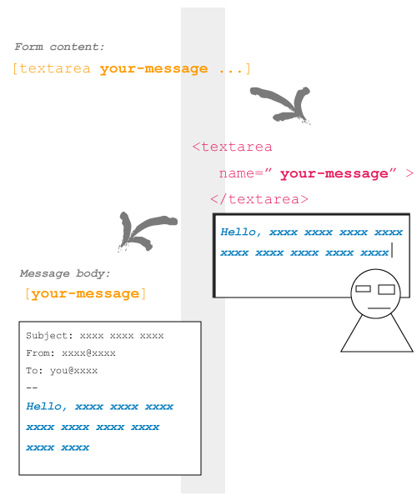
In this picture, a tag [textarea your-message ...] inserted in form content is replaced by <textarea> tag with name="your-message" attribute.

When a visitor input into this <textarea> field and submit, Contact Form 7 generates a mail based on mail template. Since message body field has [your-message] tag, this tag replaced by the user input message.

Tags in form content

You can use the following types of tags in form content.

Type Replaced by Validated as
text <input type="text" /> Any text
text* <input type="text" /> Any text / Required
email <input type="text" /> Email address
email* <input type="text" /> Email address / Required
textarea <textarea> </textarea> Any text
textarea* <textarea> </textarea> Any text / Required
select <select> </select>
select+ <select> </select>
checkbox <input type="checkbox" /> ...
checkbox+ <input type="checkbox" /> ...
radio <input type="radio" /> ...
captchac <img /> CAPTCHA
See How to use CAPTCHA
captchar <input type="text" />
submit <input type="submit" />

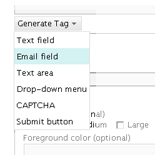
The syntax of tag is not so easy. You can use Generate Tag menu under Form textarea to make a tag you need.

I show you some examples of tags.

  • [text your-name 40/100 "John Smith"]

    This tag is replaced with:
    <input type="text" name="your-name" size="40" maxlength="100" value="John Smith" />

  • [email* your-email 60/ id:email]

    <input type="text" name="your-email" id="email" size="60" />

  • [textarea your-message 80x15 "Write message here."]

    <textarea name="your-message" cols="80" rows="15">Write message here.</textarea>

  • [select your-country "China" "India" "other"]
    <select name="your-country">
      <option value="China">China</option>
      <option value="India">India</option>
      <option value="other">other</option>
    </select>

I wrote about tag syntax.

How to use Akismet on Contact Form 7

1. You need Akismet plugin. If you have not activated it yet, activate it first.
2. Open Contact Form 7’s admin page and edit Form text area as:

  • Add akismet:author option to the tag of field which requires sender’s name.
    Example: [text* your-name akismet:author]
  • Add akismet:author_email option to the tag of field which requires sender’s email address.
    Example: [email* your-email akismet:author_email]
  • Add akismet:author_url option to the tag of field which requires sender’s URL.
    Example: [text your-url akismet:author_url]

Once you have activated the Akismet plugin and at least one of the akismet: options is set, Contact Form 7 will send all of a sender’s input as well as any other information related to input activity to the Akismet server. Akismet will then judge whether this input is likely to be spam.

When Akismet judges a message as spam, Contact Form 7 sends no mail and shows a response message with an orange border line (the third example in the picture below).
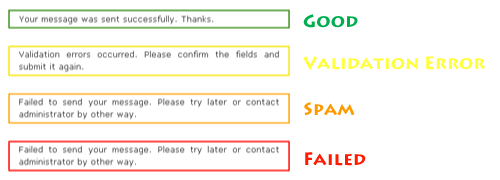
To make sure the spam filtering is working, send a message with “viagra-test-123” as the sender’s name. If the test is a success, the message will be judged as spam.

Changelog

0.9 (2007/04/30)
Initial release.
1.0 (2007/05/20)
Tag helper.
1.1 (2007/08/02)
File restructuring.
1.2 (2007/08/16)
jQuery Form Plugin introduced.
1.3 (2007/08/26)
New tag type: [select]
1.3.1 (2007/08/26)
Critical bug about JavaScript loading fixed.
1.3.2 (2007/09/03)
Bug fix around jQuery.
1.4 (2007/09/07)
Akismet spam filtering introduced.
1.4.1 (2007/09/11)
Add Spanish and Catalan translations.
1.4.2 (2007/09/13)
Add German translation.
1.4.3 (2007/09/15)
Add Polish translation.
1.4.4 (2007/09/17)
Add French translation.
1.5 (2007/10/07)
CAPTCHA introduced.
1.6 (2007/10/17)
Mail (2) and UI improvement for admin page.
1.6.1 (2007/10/27)
Sidebar widget support.
1.7 (2007/11/27)
New tag type: [select+], [checkbox], [checkbox+] and [radio]
1.7.1 (2007/12/06)
Made wpcf7 variable global. Polish translation updated.
1.7.2 (2007/12/13)
Bugfix. Czech translation added.
1.7.3 (2007/12/23)
New default: and label-first options added.
1.7.4 (2007/12/30)
select+ and checkbox+ tag types removed. multiple and exclusive options added.
1.7.5 (2008/01/26)
Two fixes and include_blank option.
1.7.6 (2008/03/02)
New acceptance tag added.

Comments

1,401 responses to “Contact Form 7”

  1. Works great, thank you

  2. angelo Avatar
    angelo

    hi – i just installed contact from 7 and really simple captcha. they showed up no problem in the plugins section. but, the field where the embed code is supposed to be is blank- and there is no tag section where i can enable capthca. help! thanks so much.

  3. kiwia Avatar
    kiwia

    Hi, Like the plugin but having trouble as return email address is being stripped off messages??

    I use the download the email messages to my yahoo account from my host but have just realised there is no return address?

    Am I missing something?

  4. Quick tip for including the Contact form in a template sidebar.

    Create a new post with the contact form in, then use the following tip to include the contents of the post (and thus the contact form) in the sidebar:

    http://wordpress.org/support/topic/218056

  5. […] Contact Form 7 – This email form is pretty simple, there are probably more powerful options available, but for what I need this does the trick. As you might expect, you can see it in action on my Contact page. […]

  6. […] החדש דף יצירת הקשר מכיל את הטופס המופק על ידי התוסף Contact Form 7. פשוט […]

  7. For a non-computer savvy person as myself, this Plugin installs easily. My only issue is that when I receive the email there is no return address…it just says [your email]

    I would greatly appreciate some help from anyone!

  8. Maybe I am missing something structural with WP, but when I send a test message I get “Failed to send your message. Please try later or contact administrator by other way.” Is there someplace that I need to set up the POP account?

  9. kiwia Avatar
    kiwia

    I’m still having same problem, I’m getting my admin email address as the return email address from sender?

  10. […] changed the contact form from the years-ancient “WP Contact Form” to the new, sexier Contact Form 7 with additional CAPTCHA support to assist the Resistance effort against robots and spam computers. […]

  11. hi,i already set up this plugin but i still confuse how to set up cc (carbon copy)? i mean user can have their email copy’s after they submit message. thanks a lot

  12. intelf Avatar
    intelf

    Any chance that CF7 will ever also write submissions to DB so they can be browsed through admin?

  13. @intelf Nope.

  14. […] of my favorite WordPress plugins is Contact Form 7 which I use on several of my WordPress based sites. Even though it’s highly customizable and […]

  15. Hi,
    not work from IE7, anyone else?
    Tnx

  16. […] Contact Form 7 Nur ein Kontakt-Formular-Plugin. Einfach, aber flexibel. Das Formular kann optimal eingestellt werden. Mehrere Variablen stehen zur Verfügung. […]

  17. Hi Miyoshi
    I love your plugin because it is simple in the best meanings of this word.

    But I have a probelm: If I’m using *fieldset* to create the form, there are p tags around the tags fieldset and this is false.

    Do you know how I can solve this?

    thanks Monika

  18. Do you know of a way to make the contact form trigger a google analytics event for conversion tracking?

  19. Chris, you can use on_sent_ok hook for it.

  20. Monika, good question, but kind of complicated for answering in blog comment. Submit it on the support forum so I can answer it.

  21. Hi Miyushi done ;-)
    Supportforum

  22. Barbara Avatar
    Barbara

    Hi Miyoshi,
    there is a way to put the feedback messages on the top of the form? Thanks

  23. Barbara, check my latest post. You can use [response] tags.

    Please use the support forum if you have technical questions next time.

  24. paratuinfo Avatar
    paratuinfo

    hello, I just installed your plugin in another website i have (www.jabhobby.com) but when I try sending and email from it I get a blank email (nothing is sent at any of the text box)

    I appreciate your help

  25. […] your WordPress admin section and add your form to your new page. My favoties are: CForms II, Contact Form 7 and […]

  26. Hi Miyoshi. Great plugin but i have some stuff to tell about it:

    Maybe there is a setting, i don’t know, but one BAD thing is that the plugin add extra markup in the code. I mean… I paste all my form (HTML) in admin area and after save… A HUGE shock! A lot of br’s and extra paragraphs. Uhm… There is a problem. So i edited some files and now everything seems to be ok.

    Another thing is the.. label tag. On checkbox/radios you MUST put labels for one simple reason: usability. Again, i edited another file and i changed this too and again everything seems to be fine.

    Now i’m wait to finish the theme and upload to a live server to check how it REALLY works.

    Anyhow, keep up the good job!

  27. enterline Avatar
    enterline

    I’ve used contact form since I’ve had my blog (4 years now) and never had a problem on upgrades but I noticed that in Firefox and IE browsers my message box has no end bar and instead of the typed message typing for x amount of columns then being forced to next line down, the message simply continues in a linear mode. I tried your tag Your Message

    and even though that made a line appear at end of box it did not force the text to next line when you reached it. Safari browser is fine, works there like it should. Any suggestions for changing something in the code?

  28. Fatal error: Call to undefined function wpcf7_cleanup_captcha_files() in /wp-content/plugins/contact-form-7/wp-contact-form-7.php on line 352

    Hi there, tried to post on the forum – it wouldn’t let me.
    anyway – this is what happens when I upgrade to 1.10.0.1
    Any ideas???
    Thanks in advance.
    Jas

  29. Hi,
    Is there a way to adjust the width of the form so it fits in my sidebar? Seen here:
    http://takesunset.com/silverlakeca/
    Thanks!
    Rob

  30. Hi,

    thanks for the simple plugin. Tried out several plugins as cforms etc. – nothing really worked out well – too big – too complicated whatever.
    Now finally got a simple and working contact form.

    Haven’t looked in detail by now – but html formatting – as table styles etc. – don’t work in the sent e-mail?

    One last hint – when I first tried the attachment wasn’t sent via contact form – after several trial and error I recognized that “[file file-xyz]” in the attachment area of the sent mail is wrong – better “[file-xyz]” -> without the command ‘file’.

    Ok, thanks

    Heiko

  31. […] Contact Form 7 by Takayuki Miyoshi. […]

  32. […] Get It Here! Flickr Photo Album I was searching for a while trying to find this plugin after seeing it on other blogs i think its a great plug in to visually show people your life with photo and ads more great content to your blog […]

  33. […] Contact Form 7 for our submission forms […]

  34. Francis Avatar
    Francis

    select in IE hides some data if its longer than the box size how do i rectify this IE 8 but in CometBird/Firefox it’s fine see below

    Type of accommodation preferred?
    [select tap include_blank “Luxury hotels/lodges/camps” “Budget hotels/lodges/camps” “Guest house”]

  35. Great Plugin thanks for sharing. I will test it.

  36. is there a way I can put the form into the header.php ?

  37. […] man dann – so wie ich – seinen Blog mit dem ganz ausgezeichneten PlugIn "Contact Form 7" ausstatten, wird das nicht von Erfolg gekrönt sein, auch wenn bei Testläufen immer die Meldung […]

  38. Is there any chance of you adding the ability to upload files in the near future? Like a way for user to add an attachment like an Image or document?

  39. envoyzero Avatar
    envoyzero

    the best form ive ever seen! keep it up bro ;)
    but sill a question: how can i change the colour of the textfields??

  40. sanjaypandit Avatar
    sanjaypandit

    i installed it very easily,, when i submit data to send a mail its responce , mail is sent successfully, but i cant receive it on my email

  41. Hey guys, do you know there is a support forum for Contact Form 7?

  42. Hi,

    How to add to the mail received after submission, the user’s IP Address that submitted the form ?

  43. @miyoshi: as a suggestion, for further version: make a function for parsing form:

    parseForm(‘[contact-form 2 "Contact form"]‘);

    Or smth similar. This way you can put the for anywhere in the template, not just in posts/widgets. I think would a nice feature !

  44. v7 is the best form plug-in available! Clean, tight and does as advertised!

  45. I was using Contact Form 7 for months without a problem. I recent switched to Linux hosting and the form was somehow deactivated. After reactivating, I upgraded to the new version, but when I click “settings” in my admin panel, I get the following error.

    Fatal error: Using $this when not in object context in /home/forthemo/public_html/wordpress/wp-content/plugins/contact-form-7/admin/admin-panel.php on line 18

    Anyone know what the problem could be?

  46. […] Contact Form 7 – Daca anunti un eveniment sau concurs, daca ai nevoie de informatii specifice de la […]

  47. i was sending a test comments,..does this spam to akismet ,.and i did not receive any emails,..izzit becoz of the i.p or does this caused by bugs,.

  48. Hello,I have a query, can i put the contact form on theme files, like i want to put a quick contact on my home page.

    Not sure how to do that

Leave a comment